Display Layout
The DF3 Series digital force gauge features a TFT-LCD full-color display with backlight.
Display Options
The DF3 Series gauge features the following display options designed to enhance operation and performance:
- Display Orientation
- Display Backlight
- Hide Measurements
Display Orientation
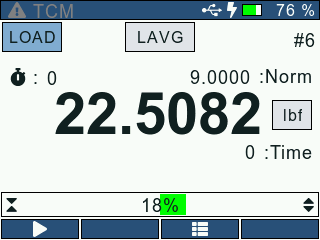
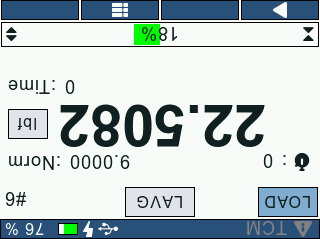
DF3 Series digital force gauges give the operator an option to invert the gauge display. This feature makes it easier for the user to analyze the readings when the gauge is held upside-down. When the display is inverted, the Navigation and Function key functionalities are swapped. The gauge display orientation can be changed from the General screen.
Display Backlight
The gauge display backlight can be adjusted from the General screen depending on the lighting conditions. The user can enter a value between (0 -100) based on his/her preference. The user can also dim the gauge backlight using the Power key when the gauge is not in use to improve the battery life.
Hide Measurements
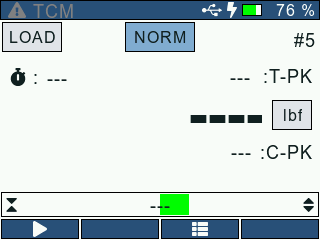
This function allows the user to “hide” the readings displayed on screen. The “hide” function is useful for blind study applications. This setting can be turned ON/OFF from the Test Setup: Display screen.
NOTE: Higher Display Backlight reduces the battery life.